Record blood pressure, medications, vitamins, food and intake. Review your timeline, connect the routines you choose, and take useful records to your healthcare professional.
Keep readings together
Start with Three readings and use average, or choose one reading. Three numbered circles show your progress, with a tick replacing each number when that reading is recorded.
All three readings in History; their average in the Timeline
30-second waits with a countdown, tips and a completion cue
Edit, delete and search earlier readings
Put context beside your readings
Review blood-pressure and pulse history next to health context recorded on the same dates, without claiming one caused the other.
Date-aligned readings and context
7-, 30- and 90-day views
All-time review included
Record medications and vitamins
Record a single medication or vitamin, or review a morning, afternoon or evening group before saving.
Saved medication and vitamin lists with optional doses
Morning, afternoon and evening tablet groups
Daily progress and a review before recording
Build a Health Timeline
View all activities, blood pressure only, or any combination of activity types. Medications and vitamins share expandable groups by day and recorded period.
Search within your selected activities
Expand a group to review or edit individual entries
Record symptoms, stress, appointments, activity, meals, sleep and notes
Connect with Apple Health
On a supported iPhone or iPad, save values you enter and show recent activity, sleep, State of Mind and Apple Watch high-heart-rate events in your Timeline.
Workouts and daily step totals
Sleep duration and recorded stages
State of Mind and Watch heart-rate events
Print for your healthcare provider
Create a paginated report of your averages, readings and notes to print and take to an appointment.
Reports for every Insights period
CSV export included
Designed to support a discussion, not provide a diagnosis
Use reminders when helpful
Attach local reminders to timeline events and review upcoming reminders on a paired Apple Watch.
Up to 12 active timeline reminders
Optional reminders to log planned meals
Paired Watch reminder context
Keep a food and nutrition diary
Search 5,432 USDA foods offline, choose a food-specific portion or gram weight, and record what you ate in your private diary.
Daily totals and individual food records
Published profiles covering 65 nutrient fields
Food records stay separate from the quick intake log and Apple Health
Log caffeine, alcohol and sugar
Use a preset or enter your own amount, then review daily totals alongside your readings in Insights.
Caffeine in milligrams, alcohol in standard drinks and sugar in grams
Intake totals in provider reports and a separate CSV export
Optional Apple Health storage and separate totals from other apps
Make Today your own
Choose and reorder the areas on Today so the readings, medications, vitamins, food and intake you use are easy to reach.
Guided introduction and setup
Show or hide areas without deleting records
Change your choices in Settings
Connect your daily routines
Connect with myDailyTasks for blood-pressure checks, completed medication rituals and planned meals.
Open a blood-pressure check and complete it by saving a reading
Compatible earlier medication rituals appear in your Timeline
Planned meals can remind you to log food
Keep control of your records
Your health journal stays in private storage on each device. Choose which Apple Health connections and reminders to enable.
Health records are not synced through iCloud
Optional product analytics is off by default
No subscription or in-app purchase
Inside the app
Journal, routines and trends — real app screens.
These existing version 1.0 screens use fictional demonstration records. They are not personal health records and do not show every screen. Open an image for a larger view.
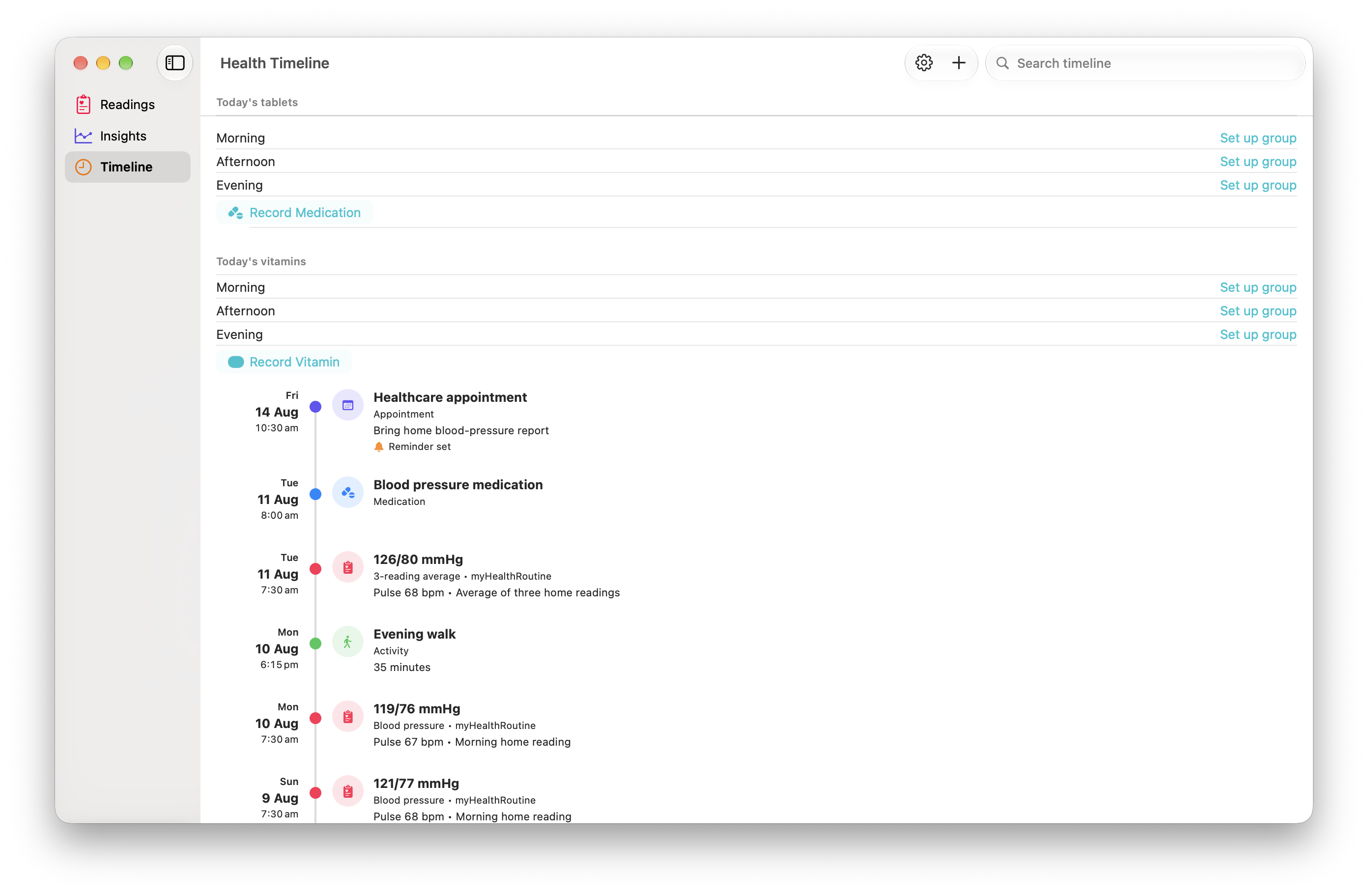
Your health journal
Review dated readings, an appointment and an activity in the Mac Health Timeline, with tablet and vitamin groups above.
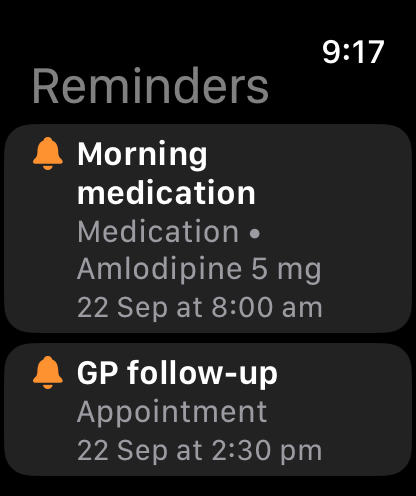
Your routine reminders
See upcoming reminders on Apple Watch. The Watch is a reminder companion; it does not measure blood pressure.
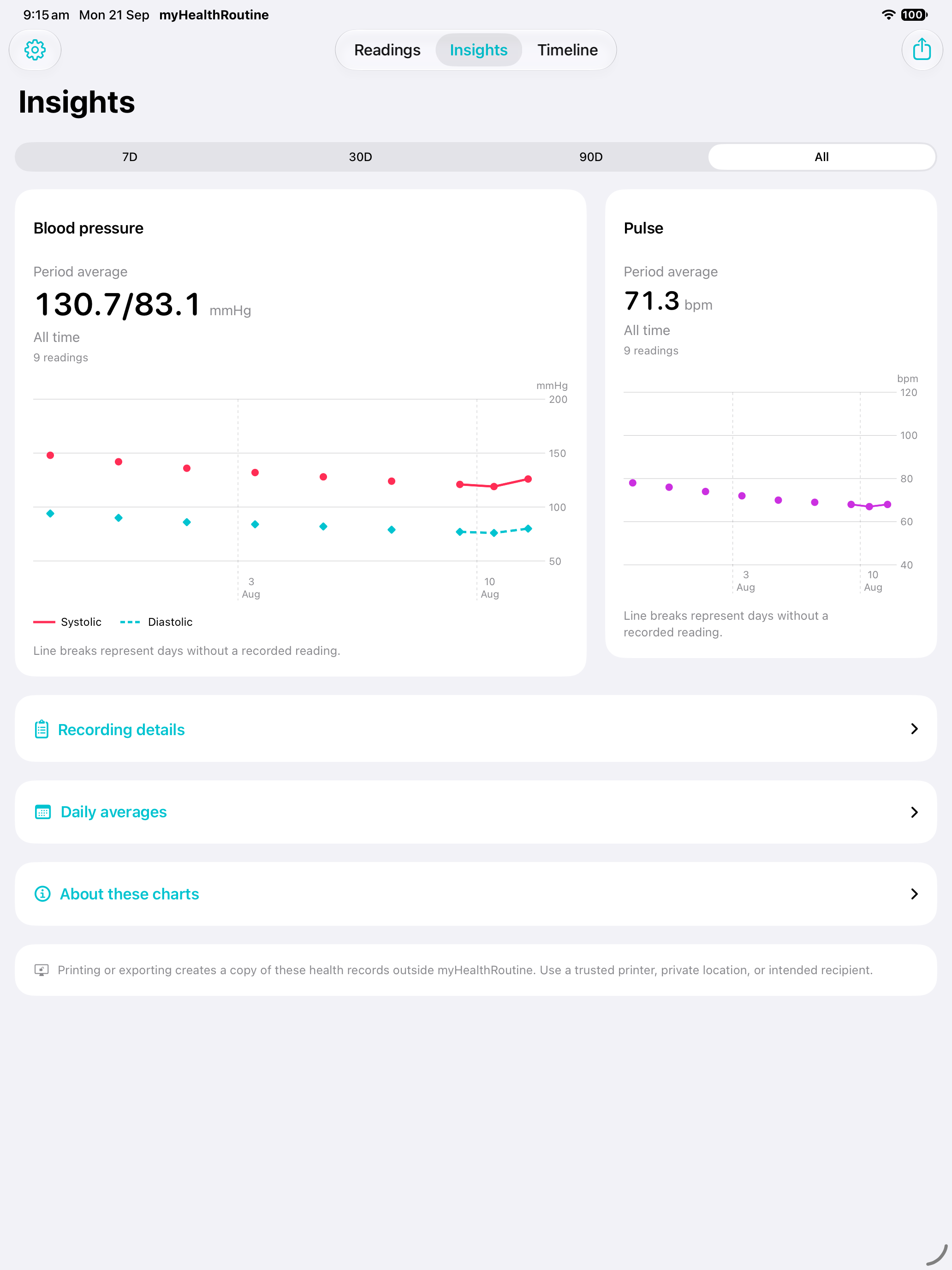
Your trends over time
Review blood-pressure and pulse charts and selected-period averages in Insights on iPad.
One timeline, clear sources
Bring together the context you choose.
myHealthRoutine labels each source so you can see where a piece of context came from. It does not combine the data into a diagnosis, prediction or treatment recommendation.
Your myHealthRoutine Timeline
Record medications, symptoms, appointments and notes, then review them alongside readings from the same period.
Stored as part of your personal myHealthRoutine record.
myDailyTasks routines and meals
Open a blood-pressure check, share a completed medication ritual in compatible earlier versions, or use a planned meal as a reminder to record food.
Connections are optional. Blood-pressure values and food details stay in myHealthRoutine.
Apple Health and State of Mind
With permission, the Timeline can show workouts, daily steps, sleep stages, State of Mind entries and Apple Watch high-heart-rate events around the same dates as your readings.
This context remains in Apple Health and is not copied into myHealthRoutine local records.
Apple Health is your choice.
On a supported iPhone or iPad, you can choose to store blood-pressure and pulse measurements entered in myHealthRoutine in Apple Health. With permission, the Health Timeline also shows available workouts, daily step totals, sleep duration and recorded REM, deep, core and awake time, State of Mind entries, and Apple Watch high-heart-rate notification events from the last 30 days. State of Mind entries can include a daily mood or momentary emotion, its pleasantness classification, selected feelings and related areas such as health, family or work. Heart-rate event rows include the Watch notification threshold and your 30-day Apple Health average when available. This is date-aligned context rather than diagnosis, clinical sleep scoring, a mood assessment or emergency monitoring. Imported information remains in Apple Health and is not copied into myHealthRoutine local records.
Connect with myDailyTasks.
A blood-pressure ritual opens the reading form; saving completes the linked check without sending measurement values back. Medication rituals shared by compatible earlier versions appear in the Timeline. Newer workflows manage medications in myHealthRoutine. Planned breakfasts, lunches, dinners and snacks can remind you to record food. Cross-device blood-pressure receipts use the separate myHealthRoutine Cloud Sync setting in compatible myDailyTasks versions; production delivery is not yet verified. Meal reminders use the plan shared on the same device. Your health journal remains local.
All features included
One ad-supported experience, without a subscription.
Readings and averages, medication and vitamin groups, food and nutrition, daily intake, timeline filters, every Insights period, reports, CSV exports and optional connections are included.